
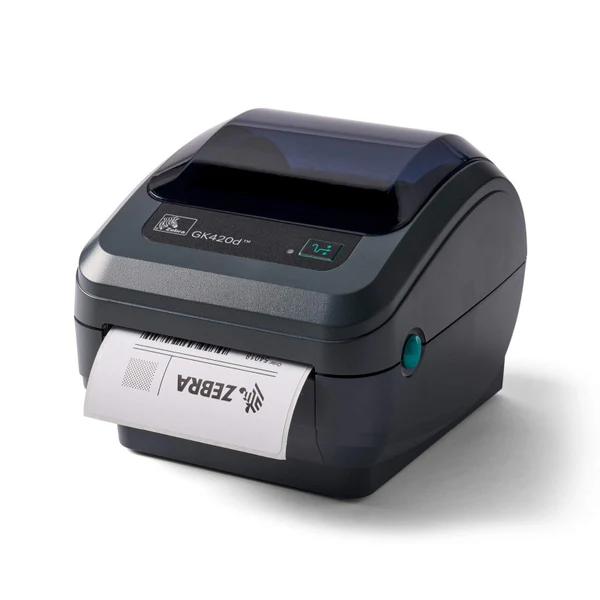
A simple, reliable label printer for shops and warehouses that need clean barcode and shipping labels without ink. The Zebra GK420D uses direct thermal printing, so you load the right thermal labels and print. It’s a good fit for daily label work at a counter, packing desk, or stock room. COD available.
Key specs:
Printer type: Label printer
Printing method: Direct thermal
Connectivity: USB
Connectivity: Serial
Why you’ll like it
Prints labels without ink or toner, so there’s less to manage day to day.
USB + Serial connections suit many older and newer setups.
Helps keep dispatch and stock tasks organised with clear, scannable labels.
Works well for repeat jobs like shelf labels, product labels, and parcel labels.
Keeps your workflow simple: connect, load labels, print.
Useful for businesses that want consistent labels across staff and shifts.
Key details
This printer is mainly about getting the basics right: direct thermal label printing, and the right connection for your system (USB or Serial). Before you order, match your label size and your software setup to avoid returns.
Key features
| Spec | Value |
|---|---|
| Brand | Zebra |
| Model | GK420D |
| Product type | Label printer |
| Printing method | Direct thermal (no ink/toner) |
| Interface | USB (from product title) |
| Interface | Serial (from product title) |
| Label size support | Check the label width you need before ordering |
| Print quality needs | Check the DPI requirement of your barcode/label format |
| Software/driver setup | Check your PC/OS and app support for GK420D |
| Barcode formats | Check the barcode types your workflow needs |
| Cables & accessories | Confirm what’s included in the box for your setup |
| Network use | If you need LAN/Wi-Fi, choose a network-ready option instead |
Direct thermal means you’ll need compatible thermal labels. It’s a practical choice for shipping and inventory labels.
USB + Serial gives you flexibility. USB is common for PCs, while Serial is often used in older POS and industrial setups.
Label size matters more than most buyers expect. Decide your label width first, then match rolls to the printer.
Print quality needs depend on your barcode. If you scan at distance or use tiny barcodes, confirm your required DPI.
Software fit is key. Your label design tool or POS/inventory software should support the GK420D model.
Plan your workstation. Make sure you have enough desk space and an easy path for labels to feed out cleanly.
Think about future upgrades. If you expect to move the printer between systems, USB can be simpler; if you rely on legacy hardware, Serial may be essential.
Reduce mis-orders by confirming ports on your device and the connector type you need (USB and Serial can vary by cable type).
Keep labels consistent by standardising one label size across your team, especially for shipping.
Test a sample roll of your chosen labels first if your workflow is sensitive (small barcodes, dense text, or tight label layouts).
Fit & compatibility
Match the printer to your workflow by confirming two things first: your label roll size and your device connection (USB or Serial). This is the fastest way to avoid wrong orders.
Connection check: confirm your system has a free USB port or a Serial port that your current setup uses.
Label check: confirm the label width you plan to print, and make sure your label rolls match it.
Software check: confirm your label software or POS/inventory app supports the GK420D and your operating system.
Compatibility note: This is a direct thermal label printer (no ink/toner). It is not designed for non-thermal labels.
Use cases
Who it’s for
Online sellers printing shipping labels and order labels
Retail stores printing shelf labels and product labels
Warehouses printing bin labels and inventory labels
Clinics and offices printing simple ID or file labels (where direct thermal labels are suitable)
Businesses that need USB or Serial connectivity for their workstation
Who should skip
Anyone who needs colour labels or ink-based printing
Teams that require built-in network printing (LAN/Wi-Fi) without using USB/Serial
Buyers unsure about label width, roll type, or software support
Buying from Kraod
COD nationwide; Returns: 7 days; Same-day delivery: Lahore only; Nationwide delivery: usually 3–4 working days; “official warranty where available + store warranty support”; Prices may vary by stock/variants.
Ready to order?
If your label size and connection match, this is a straightforward printer to add to your daily workflow.
FAQs
Is this the Zebra GK420D label printer?
Yes. This page is for the Zebra GK420D label printer as titled. Always match the exact model name in your software and setup.
Does it use ink or toner?
No. It’s direct thermal, so it prints on compatible thermal labels without ink or toner.
Is it USB + Serial or USB + Bluetooth?
This listing is USB + Serial as stated in the product title. If you need Bluetooth, choose a Bluetooth-specific variant.
What label sizes will work with it?
Label size support depends on the roll width your workflow needs. Check your required label width first, then match rolls to the printer.
Will it work with my POS or label software?
Check that your software supports the Zebra GK420D model and your operating system before ordering, especially for older POS setups.





Reviews
There are no reviews yet.