
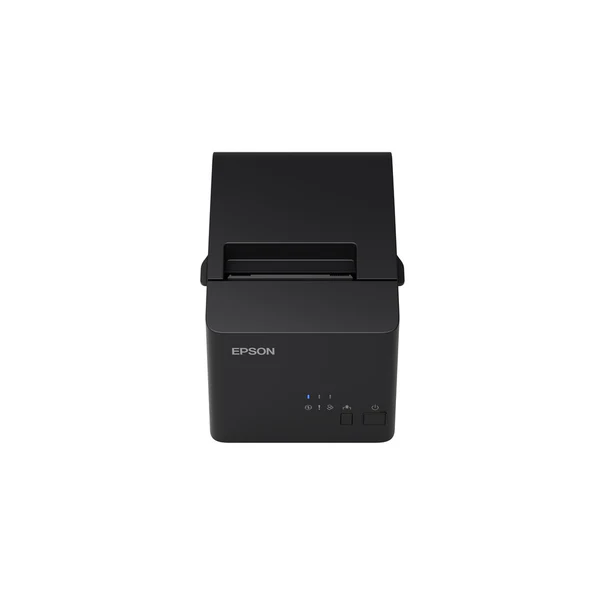
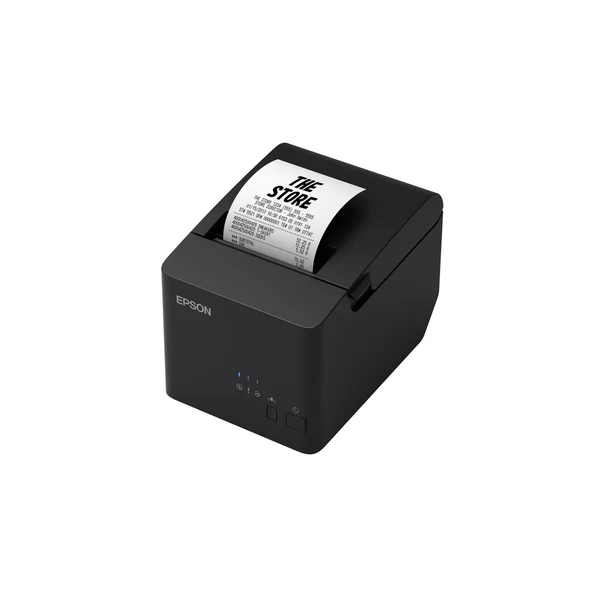

A receipt printer is the workhorse of a checkout counter, and the Epson TM-T82X is built for that everyday job: printing clear receipts fast and consistently. It’s a good fit for shops and restaurants that want a practical POS receipt printer with USB + Serial connectivity. COD available.
Why you’ll like it
Keeps checkout moving by printing receipts on demand, without extra steps
USB + Serial options help you match your current POS setup
Simple to use for staff, print, tear, hand over, done
Helps your receipts stay consistent for returns, audits, and customer records
Useful for both single counters and small multi-counter environments
Supports common POS workflows like refunds, end-of-day summaries, and order slips
Practical choice when you want a standard receipt printer, not a complicated device
Key details
This printer choice mainly comes down to your POS connection type, paper size, driver support, and what you need it to do at the counter. If you confirm those basics upfront, you avoid most setup issues and wrong orders.
Key features
| What to check | Why it matters |
|---|---|
| Connection type: USB or Serial | Your POS PC/system must match the port you plan to use. |
| POS software compatibility | Some POS apps require specific printer models or ESC/POS-style support. |
| Operating system support | Ensure drivers/workarounds exist for your OS (Windows/Linux, etc.). |
| Paper width requirement | Receipt rolls come in different widths; the wrong size won’t fit or print correctly. |
| Paper roll type | Thermal receipt printers require thermal paper; confirm your store uses it. |
| Cutter vs tear bar needs | Some setups prefer a cutter; others are fine with tear-off for speed and cost. |
| Counter space and placement | Check footprint and where cables will route (tight counters cause strain on ports). |
| Cable and power needs | Many issues come from missing/incorrect cables or power adapters. |
| Receipt use style | Short receipts vs long receipts may affect how you want loading and tearing to work. |
| Future expansion plans | If you might change POS hardware, flexible connectivity can save time later. |
After you’ve checked the basics, here’s what they mean in plain English:
USB vs Serial: USB is common for newer POS PCs. Serial is still used in older or specialised POS setups. Choose the one your system supports without extra adapters.
Software support matters: Even if the printer connects, printing can fail if your POS can’t talk to it. It’s worth confirming your POS supports Epson-compatible receipt printing.
Paper size is a deal-breaker: Buyers often assume “receipt rolls are standard.” They aren’t. Check your existing roll width before ordering.
Thermal paper: Thermal printers need thermal rolls. If you use regular paper rolls, you’ll get poor results or no print.
Box contents: Don’t assume cables or rolls are included. Confirm what you’ll receive so you can set up on day one.
Counter workflow: If staff are printing all day, easy paper loading and simple tear-off can make a real difference.
Planning ahead: If your POS hardware is older, Serial support can keep you running without replacing the whole system.
Fit & compatibility
Before you buy, match the printer to your POS hardware and your receipt roll size. Most “it doesn’t work” issues come from a connection mismatch, missing drivers, or the wrong paper width.
Use this quick compatibility checklist:
Your POS device: Is it a Windows PC, POS terminal, or another system?
Port available: Do you have USB, Serial, or both available on your POS device?
POS software: Does it support Epson-compatible receipt printers or list the TM series as supported?
Receipt rolls: What width do you currently use? Check an existing roll or the holder inside your old printer.
Setup method: Will you print directly from the POS app, or through a driver in Windows?
Compatibility note: This is a POS receipt printer for receipts and counter printing. It is not a normal A4 office printer.
Use cases
Who it’s for:
Retail checkout counters needing printed receipts for every sale
Cafés and restaurants printing order slips or customer receipts
Pharmacies that want consistent receipts for record-keeping
Small businesses upgrading from a basic, unreliable receipt printer
Businesses that need USB + Serial options to fit mixed hardware
Counters where staff want quick, simple printing without training
Who should skip:
Anyone needing A4 document printing (invoices on full pages, reports)
Buyers who haven’t checked their paper width or POS compatibility
Setups that require specialised mobile printing (without a PC/POS terminal)
Buying from Kraod
COD nationwide; Returns: 7 days; Same-day delivery: Lahore only; Nationwide delivery: usually 3–4 working days; “official warranty where available + store warranty support”; Prices may vary by stock/variants.
Ready to order?
If your POS supports USB or Serial and your paper size matches, this is a practical receipt printer to keep your counter running smoothly.
FAQs
Does the Epson TM-T82X work with my POS software?
It depends on your POS app. Check if your software supports Epson-compatible receipt printers or can print through a standard driver.
Should I use USB or Serial to connect it?
Use the port your POS device supports best. USB is common on newer systems. Serial is often used on older POS terminals.
What paper roll should I use?
Confirm your required roll width and thermal paper type before ordering. If you already have a printer, match your current roll size.
Will it work with Windows or Linux?
Driver and setup support depend on your operating system and POS software. Check OS compatibility before purchase to avoid installation issues.
What’s usually needed for setup?
You typically need the correct connection cable, power, drivers (if required), and POS software settings. Confirm what’s included in the box so you can set up right away.







Reviews
There are no reviews yet.