
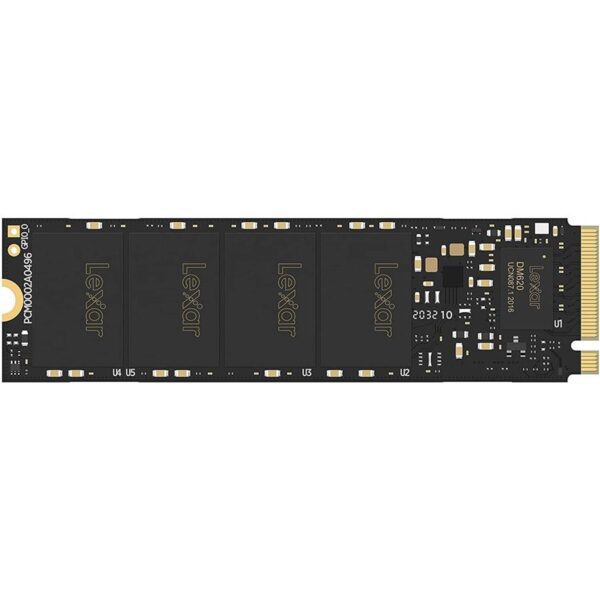
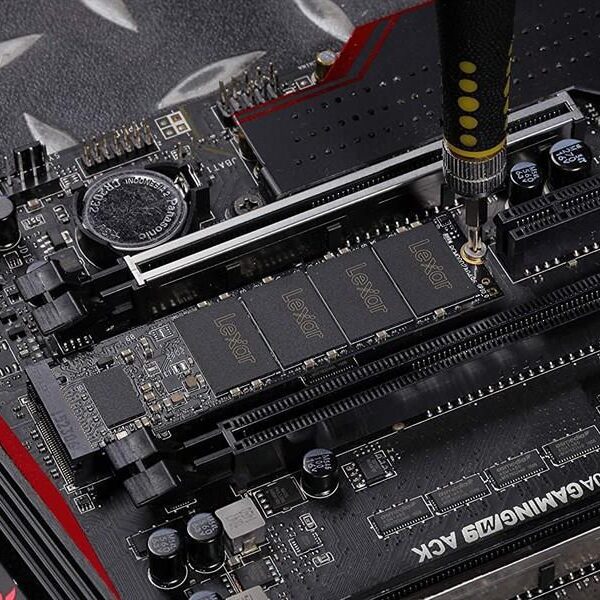
Lexar NM620 512GB NVMe SSD for a faster, more responsive PC
The Lexar NM620 512GB is an internal M.2 NVMe SSD made for people who want a faster system without overspending. It’s a smart upgrade for students, gamers, and professionals who are tired of slow boot times, long app loads, and heavy file transfers. If your laptop or desktop supports NVMe, this drive can make your PC feel much quicker in daily use.
The upgrades you’ll feel
Faster boot and app launch for a snappier PC
Quicker game loading and smoother installs
Better workflow speed for projects, downloads, and file copying
Key specs, made simple
Capacity: 512GB
Form factor: M.2 2280
Interface: PCIe Gen3x4
NVMe: NVMe 1.4
Speed (max): Up to 3,500 MB/s read (write speed can vary by listing)
Endurance (rated on some listings): Up to 250 TBW
Reliability (listed by some sellers): Up to 1,500,000 hours MTBF
Why NM620 is a popular upgrade
A clean step up from SATA
If you’re coming from a 2.5-inch SATA SSD, NVMe usually feels faster for big file moves and heavy apps. For many users, it’s also the easiest way to modernise a PC build.
Great fit for gaming and study builds
This drive is commonly chosen as a main Windows drive plus a few big games or software tools. It helps reduce waiting time when you restart, open apps, or load maps and levels.
Efficient for laptops
NVMe drives like this are often picked for laptops because they’re compact and can help with overall responsiveness. Many buyers also like the “less power wasted” feel compared to older storage types, though real battery impact depends on your laptop and usage.
What to check before you buy
NVMe SSDs are simple to install, but compatibility matters. Run through this quick list:
Does your device support NVMe (not just M.2)?
Some M.2 slots support SATA only. Confirm your laptop/motherboard supports “NVMe / PCIe” storage.Is it the right size (M.2 2280)?
This drive is 2280 size. Make sure your device supports 80mm M.2 drives.PCIe Gen3 vs Gen4 slots
A Gen4 slot is usually backwards compatible with Gen3 drives, so this can still work fine. Your maximum speed will match the slot and platform.How much space do you need?
512GB is ideal for Windows + key apps + a few large games. If you store lots of media or many games, a 1TB drive may feel easier long term.Plan your upgrade method
If you’re replacing your current drive, decide between cloning (faster setup) or a fresh Windows install (cleaner start). Both work—just plan it first.
Fit and compatibility notes
This is an internal M.2 2280 NVMe SSD for compatible laptops and desktop PCs. Check your device supports NVMe/PCIe storage before ordering.
FAQ
Is the Lexar NM620 512GB good for gaming?
If you want quicker game loads and smoother system performance, it’s a solid Gen3 NVMe upgrade for compatible PCs.
Will it work in a Gen4 motherboard?
Often yes, because Gen4 slots usually support Gen3 drives. Performance will run at Gen3 levels.
Delivery, returns, and warranty (Kraod)
Kraod. COD nationwide. Returns 7 days. Same-day Lahore only. Nationwide delivery usually 3–4 working days. Warranty: official warranty where available + store warranty support. Prices may vary by stock/variants.
If you want a reliable speed boost for a Gen3 NVMe system, the Lexar NM620 512GB is a practical upgrade to consider.


![[A3] Lexar 8GB DDR4 3200MHz SO-DIMM laptop RAM in sealed blister packaging with model LD4AS008G-B3200GSST printed on label.](https://kraod.com/wp-content/uploads/2025/06/lexar-sodimm-8gb-3200-ld4as008g-b3200gsst-351x600.jpg)
![[A2] Lexar DDR4 3200MHz 8GB laptop memory retail box, highlighting SO-DIMM format for notebook RAM upgrades and compatibility.](https://kraod.com/wp-content/uploads/2025/06/lexar-8gb-ddr4-3200-sodimm-laptop-600x600.jpg)




Reviews
There are no reviews yet.