

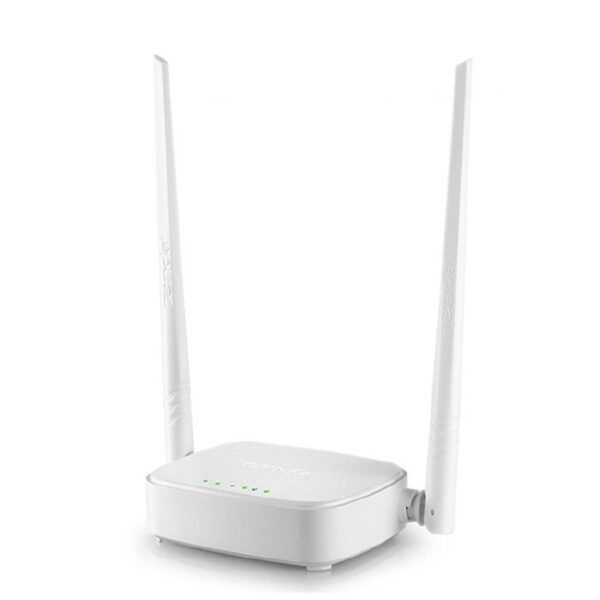

The Tenda N300 Wireless Easy Setup Router is a basic, single-band Wi-Fi router for everyday internet at home. It’s made for people who want a simple setup and steady Wi-Fi for browsing, online classes, and social apps. If your main devices use 2.4GHz Wi-Fi and you don’t need extra features, this is a practical pick. COD available.
Why you’ll like it
Quick to get online with WPS and easy setup style controls
2.4GHz Wi-Fi is widely compatible with everyday phones and laptops
N300 speed class suits light home use and simple internet plans
Fast Ethernet ports help you connect a PC, TV box, or console by cable
Useful security options like WPA/WPA2 help protect your network
Handy modes (like client, WISP, and repeater) support different setups
A straightforward router for small spaces and simple needs
Key details
This router is best for 2.4GHz Wi-Fi users who want a simple setup, N300 speeds, and basic wired ports. The key is confirming the exact model name on the box so you get the ports, antennas, and modes you expect.
Key features
| Spec | Value |
|---|---|
| Wi-Fi speed class | Up to 300 Mbps (N300) |
| Wi-Fi band | Single-band 2.4GHz |
| Wi-Fi standard | IEEE 802.11b/g/n (802.11n) |
| Wired ports (total) | 4× RJ45 ports |
| WAN port | 1× Fast Ethernet (10/100) |
| LAN ports | 3× Fast Ethernet (10/100) |
| Quick setup feature | WPS button (one-touch setup/security) |
| Security encryption | WPA/WPA2 (and WEP variants listed) |
| Supported modes | Client / WISP / Repeater mode |
| Access Point capability | Access Point mode (on supported variants) |
N300 (300 Mbps) is a speed class used for basic home internet. Real results depend on your line speed and signal conditions.
2.4GHz only means better compatibility and longer range in many homes, but it won’t give you a 5GHz network.
802.11b/g/n works with many everyday devices. If your device supports 2.4GHz Wi-Fi, it should connect normally.
Fast Ethernet (10/100) is great for basic wired connections, but it is not a gigabit. If you need gigabit speeds, check before ordering.
1 WAN + 3 LAN helps you plug in a modem/ONT to WAN, then connect other devices to LAN.
WPS can make setup faster, especially for users who don’t want to type a long password on every device.
WPA/WPA2 are common security options. Use a strong Wi-Fi password for better protection.
Client/WISP/Repeater modes can help in special setups (like using another network as the uplink), but the steps vary by ISP and layout.
Access Point mode is useful if you want to extend a wired network into Wi-Fi, but you should confirm the mode list on your unit.
Fit & compatibility
This is a single-band 2.4GHz N300 router, so it’s a good fit if your devices and needs are basic. Before you order, confirm the exact model name on the box so you don’t mix up N300 “easy setup” variants.
Wi-Fi band check: Works on 2.4GHz. It does not create a 5GHz network.
Device check: Your phone/laptop should support 2.4GHz Wi-Fi (802.11b/g/n). Most do.
Port expectation: Wired ports are Fast Ethernet (10/100). If you need a gigabit for large downloads or NAS use, this won’t match.
ISP setup: If you use an ISP device (modem/ONT), you may need to set it to bridge mode or use router mode correctly. If unsure, ask your ISP what they recommend.
Mode check: Some listings mention client, WISP, repeater, or access point modes. If you are buying for one specific model, confirm it on your unit’s box/manual.
Antenna count check: Antennas vary by variant (some listings show 2, 3, or 4 external antennas). If placement and coverage matter, confirm the antenna count before ordering.
Compatibility note: This is a 2.4GHz N300 router. It is not a dual-band (2.4GHz + 5GHz) router.
Also known as: N301, F3, F6.
Use cases
Who it’s for
Basic home Wi-Fi for browsing and messaging
Online classes and everyday app use
Small flats, rooms, or hostel setups
Users who want a simple setup and WPS
Homes that want a few wired connections via LAN ports
Anyone who only needs 2.4GHz Wi-Fi
Who should skip
Users who need 5GHz Wi-Fi
Homes that want gigabit wired ports
Heavy users with lots of high-demand devices at once
Buyers who need a specific variant (N301/F3/F6) but haven’t verified the model on the box
Buying from Kraod
COD nationwide; Returns: 7 days; Same-day delivery: Lahore only; Nationwide delivery: usually 3–4 working days; “official warranty where available + store warranty support”; Prices may vary by stock/variants.
Ready to order?
If you want a simple 2.4GHz router for everyday use, this is a clean, budget-friendly choice.
FAQs
Is Tenda N300 the same as Tenda N301?
In Pakistan listings, “N300 easy setup router” is often used as a class name. Always check the exact model on the box (for example, N301, F3, or F6) before ordering.
Does this Tenda N300 router support 5GHz?
No. It is a single-band router that works on 2.4GHz Wi-Fi only.
How many LAN ports does it have?
It has 4 RJ45 ports total: 1× WAN and 3× LAN. The ports are Fast Ethernet (10/100).




Reviews
There are no reviews yet.