
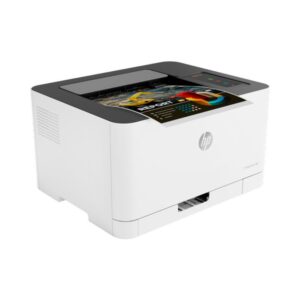


If you need reliable colour documents without stepping up to a big office machine, the HP Colour Laser 150nw is a practical fit. It’s a print-only colour laser printer made for everyday invoices, letters, labels, and simple marketing prints. Setup is straightforwar,d whether you want USB, wired network, or Wi-Fi. COD available.
Why you’ll like it
Keeps your desk setup simple with one printer for both colour and black documents.
Easy to share in a small office using Ethernet or Wi-Fi, without moving cables around.
Useful for mixed workflows when some users prefer USB while others print over the network.
Clear, consistent text and graphics with 600 × 600 dpi print resolution.
Fits lighter office volumes with a stated monthly duty cycle up to 20,000 pages.
Helps reduce paper jams and reloads with a 150-sheet input tray and 50-sheet output bin.
Less confusion at checkout: this is the “nw” model with USB + Ethernet + Wi-Fi (not a multi-function printer).
Key details
This model is best when you want colour laser printing plus flexible connectivity. The main thing to confirm before ordering is duplex: it does not do automatic two-sided printing.
Key features
| Spec | Value |
|---|---|
| Printer type | Colour laser |
| Function | Print only |
| Product number / MPN | 4ZB95A |
| Print speed (ISO, A4) | Up to 18 ppm black / up to 4 ppm colour |
| Print resolution | 600 × 600 dpi |
| Connectivity | USB + Ethernet + Wi-Fi |
| USB standard | USB 2.0 |
| Paper input | 150-sheet input tray |
| Paper output | 50-sheet output bin |
| Memory | 64 MB |
| Duplex printing | Manual (driver support provided) |
| Monthly duty cycle (A4) | Up to 20,000 pages |
Print speed is often written differently across listings. ISO (A4) is stated as up to 18 ppm black and up to 4 ppm colour. Some listings show “19 ppm black / 4 ppm colour”. Treat that as a listing label, not a promise.
“Print only” means it does not scan or copy. If you need scanning, choose a multi-function model instead.
USB + Ethernet + Wi-Fi gives you options: USB for one PC, Ethernet for a stable office network, and Wi-Fi when you can’t run a cable.
USB 2.0 is a standard label used in specs. It helps if you’re matching to older office PCs and hubs.
The 150-sheet input tray suits day-to-day printing. It reduces reloads compared to small 60–100 sheet trays.
The 50-sheet output bin is designed for shorter runs. For longer runs, plan to clear the output to avoid stacking issues.
Manual duplex means you can print double-sided by turning pages yourself, if your driver/app supports the workflow. It is not an automatic duplex.
The duty cycle figure helps you judge upper limits. For steady monthly volume, keep your usage sensible to avoid wear.
Memory (64 MB) is a listing spec that matters for basic office jobs. Very heavy graphics files may print more slowly depending on the PC and settings.
If you print on labels or glossy media, use the supported media types your supplier lists and test a small batch first.
Fit & compatibility
Choose this printer if you want a colour laser with USB, Ethernet, and Wi-Fi in one unit. Before you order, confirm you are happy with manual duplex and a print-only device.
Duplex note: it does not have automatic duplex printing. Manual duplex may be supported via driver workflow.
Connectivity check: this “nw” model is commonly listed with USB + Ethernet + Wi-Fi. If you only need USB, make sure you are not paying for network features you won’t use.
Toner check: this model is commonly listed with HP 116A / 117A / 118A toner cartridges. Toner codes can vary by region and package, so match the exact toner series to your printer model and local availability.
Cartridge compatibility note: Some listings mention HP “dynamic security”, which can block non-HP chip cartridges. If you plan to use third-party toner, confirm compatibility before purchase.
Also known as: HP Colour LaserJet 150nw, HP Colour Laser M150nw, 4ZB95A.
Use cases
Who it’s for
Home offices print invoices, forms, and occasional colour pages.
Small teams need a shared printer over Ethernet or Wi-Fi.
Shops print simple price lists, product sheets, and customer documents.
Users who want a colour laser but don’t need scanning or copying.
Offices that prefer wired network printing but want Wi-Fi as a backup.
Anyone upgrading from an inkjet who wants cleaner text and less smudging.
Who should skip
Anyone who needs automatic two-sided printing.
Users who require scan/copy features on the same machine.
High-volume environments that need larger trays and higher recommended monthly volume.
Buyers who must use non-HP chip cartridges and cannot accept potential dynamic security limits.
Buying from Kraod
COD nationwide; Returns: 7 days; Same-day delivery: Lahore only; Nationwide delivery: usually 3–4 working days; “official warranty where available + store warranty support”; Prices may vary by stock/variants.
Ready to order?
If you want a straightforward colour laser printer with USB, Ethernet, and Wi-Fi, the HP Color Laser 150nw is a solid everyday choice.
FAQs
Does HP Color Laser 150nw support duplex printing?
It does not have automatic duplex. Manual duplex may be supported via driver workflow, where you reinsert pages to print the second side.
Does it have USB, Ethernet, and Wi-Fi?
Yes, this “nw” model is listed with USB, Ethernet, and Wi-Fi, giving you flexible setup for one PC or a small network.
Which toner works with HP 150nw?
Listings commonly reference HP 116A / 117A / 118A toner cartridges. Match toner to the exact printer model and region before ordering.
What is the print resolution?
It is listed as 600 × 600 dpi, which is suitable for sharp text and clean everyday colour documents.
Is it the same as HP Color LaserJet 150nw or M150nw?
Those names appear as common listing variants for the same 150 series. For the safest match, verify the product number/MPN: 4ZB95A.








Reviews
There are no reviews yet.