
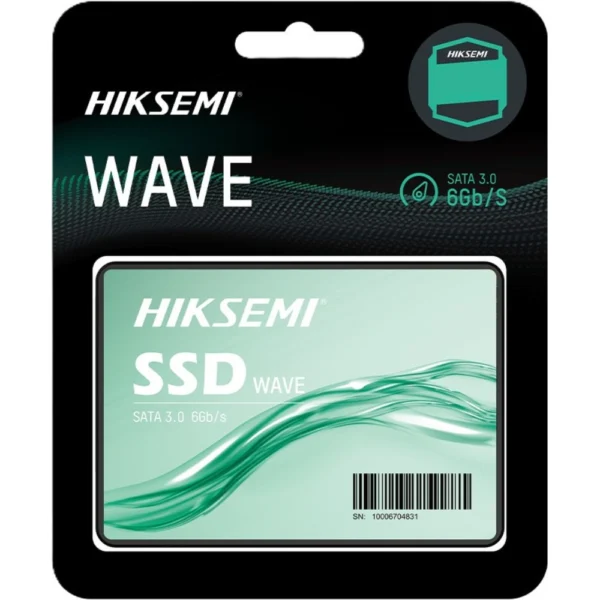
Hiksemi WAVE(S) 256GB SATA SSD for everyday speed
The Hiksemi WAVE(S) Consumer 256GB is a 2.5-inch SATA SSD built for simple upgrades. It’s a great fit for students who want a snappier laptop, professionals who need smoother office work, and anyone using an older PC that still feels slow. If your system is on a hard drive, moving to an SSD is one of the easiest ways to make it feel faster in daily use.
The benefits you’ll actually feel
Quicker boot and shutdown compared to a traditional hard drive
Faster app launches for browsers, Office, and study tools
Smoother file access for day-to-day copying and saving
What to check before you buy
Because different PCs are built differently, these quick checks help you buy the right SSD the first time.
1) Make sure you need a 2.5-inch SATA SSD
This drive type fits many laptops and desktops, but not all. Some newer slim laptops only support M.2 storage. If your laptop currently has a 2.5-inch drive bay, this is the right style.
2) Confirm the connection: SATA (not NVMe)
SATA SSDs use a SATA data connector and a SATA power connector. If your device has an NVMe-only slot (M.2 PCIe), a 2.5-inch SATA SSD won’t install without a separate bay and connectors.
3) Check the available space and thickness
Many laptops accept a slim 2.5-inch drive. If your laptop uses a caddy or bracket, you’ll usually reuse the same parts from your old drive. Desktops are easier: you can mount it in a 2.5-inch tray or use an adapter bracket in a 3.5-inch bay.
4) Decide how you’ll move your data
You have two common options:
Clone your old drive, so Windows and your files stay the same. This is best when you want zero setup.
Fresh install Windows for the cleanest feel, especially if your system has become messy or slow over time.
Either way, back up important files first.
5) Choose the right capacity for your use
256GB is ideal for Windows, core apps, and daily files. If you store big games, large video projects, or lots of media, you may want a higher capacity so you don’t fill it too quickly.
Who should buy the 256GB version?
Students and office users
If your laptop is slow to start or freezes when opening multiple tabs and apps, an SSD upgrade can make it feel more responsive without buying a new machine.
Budget gaming and older PCs
SATA SSDs won’t match high-end NVMe drives, but they still reduce loading times compared to a hard drive. For older builds, it’s a strong value upgrade.
A clean “OS + apps” drive
Some users install Windows and apps on a smaller SSD for speed, and keep a second drive for files. 256GB works well for that setup if you already have extra storage.
Fit and compatibility
This SSD is designed for laptops and desktop PCs that support a 2.5-inch SATA (SATA 3.0 / 6Gb/s) drive.
FAQ
Will a SATA SSD work in any laptop?
Only if your laptop has a 2.5-inch SATA bay (or SATA connectors). If your laptop supports only M.2 NVMe, you’ll need an NVMe SSD instead.
Is 256GB enough for Windows?
For Windows and everyday apps, yes. If you install many large games or heavy creative apps, consider a higher capacity.
Delivery, returns, and warranty (Kraod)
Kraod. COD nationwide. Returns 7 days. Same-day Lahore only. Nationwide delivery usually takes 3–4 working days. Warranty: official warranty where available + store warranty support. Prices may vary by stock/variants.
Want a simple speed upgrade without changing your whole system? The Hiksemi WAVE(S) 256GB SATA SSD is a practical place to start.



Reviews
There are no reviews yet.